Authentication with Next.js and Geobase
In this guide, we’ll walk you through implementing a modern authentication blueprint using Next.js 14 and Geobase, featuring server-side session management, protected routes, and secure middleware handling.

What’s Included
This authentication blueprint provides:
- 🔐 Server-side and client-side auth utilities
- 🚀 Middleware session management
- 🛡️ Protected route handling
- 🍪 Secure cookie management
- 📱 SSR-compatible authentication
This implementation uses geobase’s SSR-compatible authentication helpers for optimal security and performance.
GitHub Repository
You can find the complete source code for this authentication system in the following GitHub repository:
Authentication Patterns
Geobase Auth can be implemented in several ways:
-
Server-Side Authentication (Recommended)
- Tokens stored in cookies
- Protected API routes
- Server-side session verification
-
Client-Side Authentication
- Browser-based token storage
- Real-time subscription support
- Instant UI updates
Server-side auth is recommended for better security and SEO optimization.
Implementation
Client Setup
Create a browser client for client-side authentication:
// utils/geobase/client.ts
import { createBrowserClient } from '@supabase/ssr'

export function createClient() {
  return createBrowserClient(
    process.env.NEXT_PUBLIC_GEOBASE_URL!,
    process.env.NEXT_PUBLIC_GEOBASE_ANON_KEY!
  )
}
Server Setup
Set up server-side authentication handling:
// utils/geobase/server.ts
import { createServerClient } from '@supabase/ssr'
import { cookies } from 'next/headers'

export function createClient() {
  const cookieStore = cookies()

  return createServerClient(
    process.env.NEXT_PUBLIC_GEOBASE_URL!,
    process.env.NEXT_PUBLIC_GEOBASE_ANON_KEY!,
    {
      cookies: {
        get(name) {
          return cookieStore.get(name)?.value
        },
        set(name, value, options) {
          try {
            cookieStore.set(name, value, options)
          } catch {
            // Cookie setting in Server Components can be ignored if middleware handles session refresh
          }
        },
        remove(name, options) {
          try {
            cookieStore.set(name, '', { ...options, maxAge: 0 })
          } catch {
            // Cookie removal in Server Components can be ignored if middleware handles session refresh
          }
        }
      }
    }
  )
}
Middleware Configuration
Create a middleware handler to protect routes and manage sessions:
// middleware.ts
import { type NextRequest } from 'next/server'
import { updateSession } from '@/utils/geobase/middleware'

export async function middleware(request: NextRequest) {
  return await updateSession(request)
}

export const config = {
  matcher: [
    '/((?!_next/static|_next/image|favicon.ico|.*\\.(?:svg|png|jpg|jpeg|gif|webp)$).*)',
  ],
}The middleware matcher pattern excludes static files and images while protecting all other routes. Adjust the pattern based on your needs.
Session Management
Implement session updates in the middleware:
// utils/geobase/middleware.ts
import { createServerClient } from '@supabase/ssr'
import { NextResponse, type NextRequest } from 'next/server'

export async function updateSession(request: NextRequest) {
  let response = NextResponse.next({
    request: {
      headers: request.headers,
    },
  })

  const geobase = createServerClient(
    process.env.NEXT_PUBLIC_GEOBASE_URL!,
    process.env.NEXT_PUBLIC_GEOBASE_ANON_KEY!,
    {
      cookies: {
        get(name) {
          return request.cookies.get(name)?.value
        },
        set(name, value, options) {
          request.cookies.set({
            name,
            value,
            ...options,
          })
          response = NextResponse.next({
            request: {
              headers: request.headers,
            },
          })
          response.cookies.set({
            name,
            value,
            ...options,
          })
        },
        remove(name, options) {
          request.cookies.set({
            name,
            value: '',
            ...options,
          })
          response = NextResponse.next({
            request: {
              headers: request.headers,
            },
          })
          response.cookies.set({
            name,
            value: '',
            ...options,
          })
        },
      },
    }
  )

  const { data: { user } } = await geobase.auth.getUser()

  if (!user && !request.nextUrl.pathname.startsWith('/login')) {
    const url = request.nextUrl.clone()
    url.pathname = '/login'
    return NextResponse.redirect(url)
  }

  return response
}Avoid adding logic between createServerClient and geobase.auth.getUser() to prevent unexpected session termination.
Environment Setup
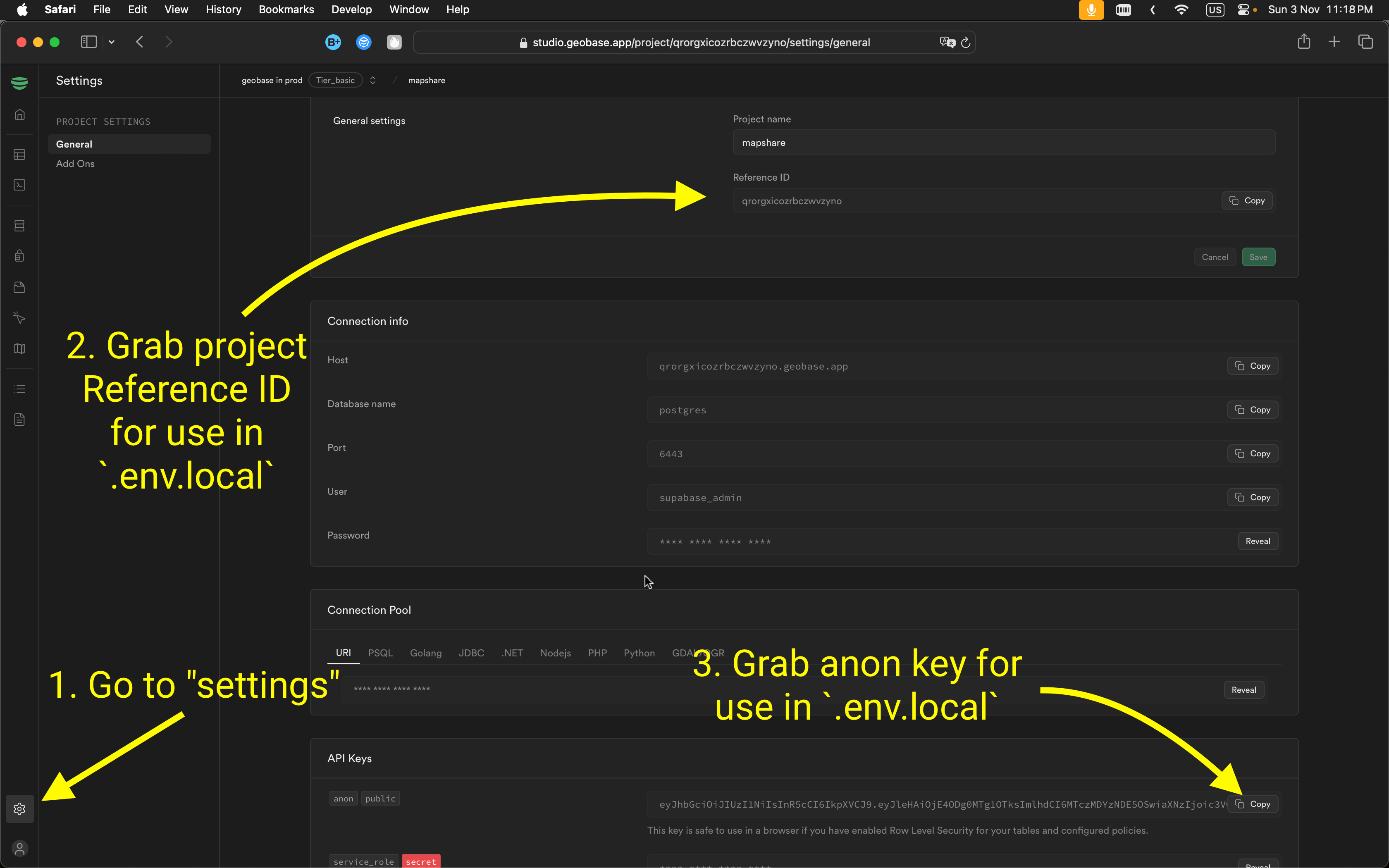
To connect your app to Geobase, configure these environment variables. Include them in a .env.local file for local development.
NEXT_PUBLIC_GEOBASE_URL=https://YOUR_PROJECT_REF.geobase.app
NEXT_PUBLIC_GEOBASE_ANON_KEY=YOUR_GEOBASE_PROJECT_ANON_KEY
You can locate the project reference and anon key in your Geobase project settings.
Local Development
- Set Node.js version: Use Node version 21:
nvm use 21 - Install dependencies: Use your preferred package manager:
npm install # or yarn # or pnpm install - Start the development server with HTTPS enabled:
npm run dev -- --experimental-https
# or
yarn dev --experimental-https
# or
pnpm dev --experimental-https
Note: Without --experimental-https, the email verification links might redirect to https://localhost:3000/..., causing errors. You can navigate manually by removing https from the URL if needed.
Access the project at https://localhost:3000.
Best Practices
-
Cookie Management
- Always return the middleware response object as is
- Maintain cookie synchronization between browser and server
- Handle cookie operations carefully in Server Components
-
Session Handling
- Implement proper error handling for auth operations
- Use try-catch blocks for cookie operations
- Consider middleware refresh patterns for Server Components
-
Security
- Protect sensitive routes using middleware
- Implement proper redirect handling
- Maintain secure cookie handling practices

Learn More
For support and questions, join the Geobase discord community .