Realtime Map Application (Vue) using Geobase
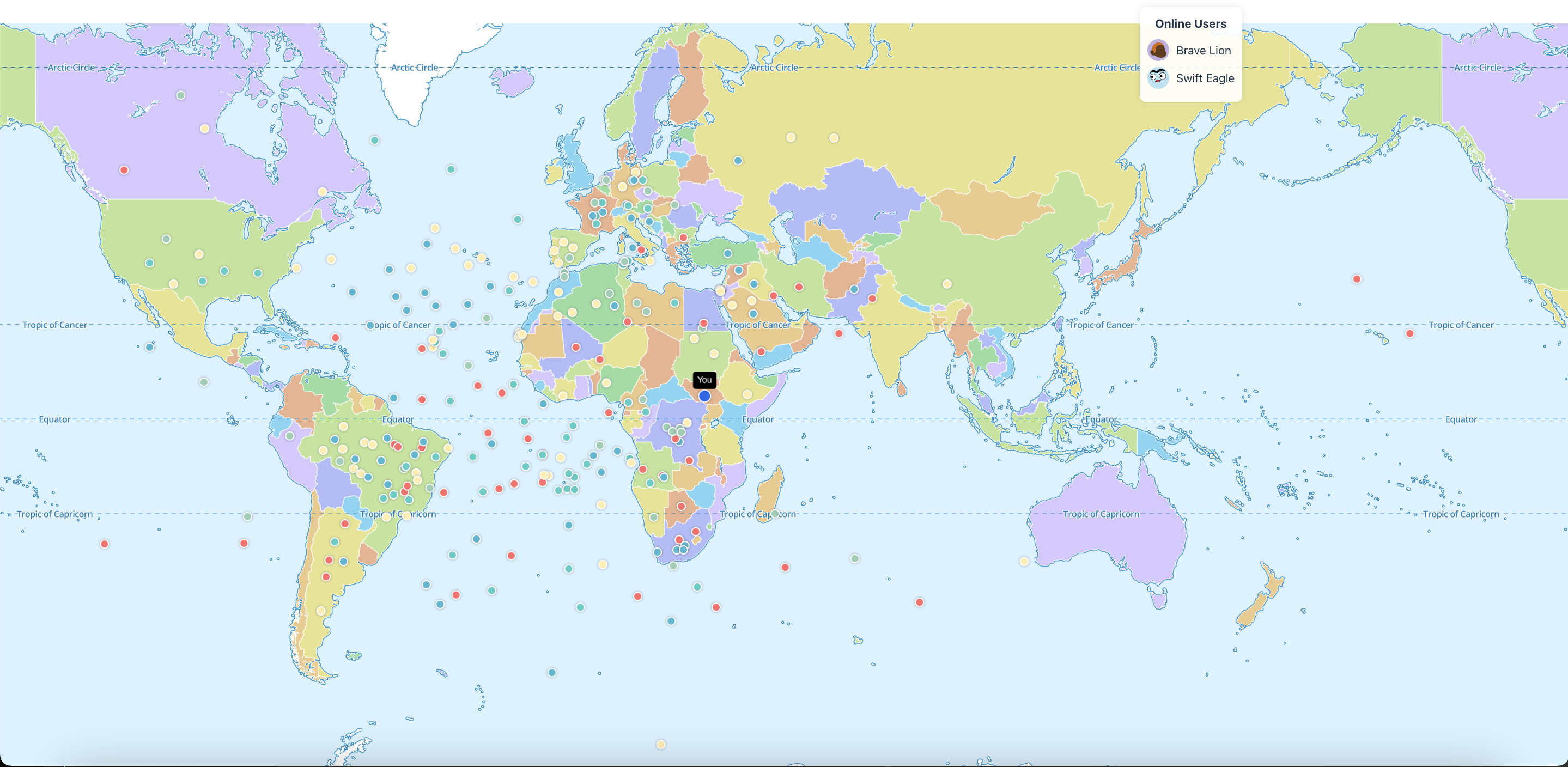
This document describes the implementation of a realtime map application that allows users to broadcast their position, drop pins, and view other users in real time.
Key Features
-
Presence Tracking
- Users join a shared room and their online presence is tracked.
- Displays the total number of online users and their generated usernames.
-
Realtime Movement
- Users can move their cursor on the map, and their position is broadcasted to others.
- Other users’ movements are displayed on the map with color-coded markers.
-
Pin Dropping
- Users can drop pins at specific locations on the map.
- Pins are stored in the
pinstable in Geobase and broadcasted in real time to all users.
-
Session Management
- User sessions are tracked to manage online users.
Ensure that your Geobase configuration is correctly set up to handle real-time data efficiently.
Component: MapScreen.vue
Template
The UI includes a full-screen map with information panels for the user ID, online users, and status.
<template>
  <div class="h-screen w-screen relative">
    <div ref="mapContainerRef" class="h-full w-full"></div>
    <div class="info-panel">
      <div class="info-item">
        <strong>Your ID:</strong> {{ userId }}
      </div>
      <div class="info-item">
        <strong>Online Users:</strong> {{ Object.keys(presenceState).length }}
      </div>
      <div class="info-item">
        <strong>Status:</strong> {{ status }}
      </div>
    </div>
    <div class="online-users">
      <h3>Online Users</h3>
      <ul>
        <li v-for="(name, uid) in presenceState" :key="uid" class="user-item">
          <img :src="getUserAvatar(uid)" alt="avatar" class="user-avatar" />
          <span>{{ name }}</span>
        </li>
      </ul>
    </div>
  </div>
</template>
Script Logic
-
Map Initialization
- Uses MapLibre to render the map.
- Tracks mouse movement and pin drop events.
-
Geobase Realtime Setup
- Initializes a Geobase channel for presence and broadcast events.
- Listens for
mouse-moveandpin-dropevents to update the map in real time.
-
Presence Management
- Tracks users joining or leaving the room and updates the
presenceState.
- Tracks users joining or leaving the room and updates the
-
Pin Management
- Loads existing pins from the
pinstable on mount. - Saves new pins to the Geobase database.
- Loads existing pins from the
The map and presence features are designed to provide a seamless real-time experience for users.
<script>
import { ref, reactive, onMounted, onUnmounted } from "vue";
import { v4 as uuidv4 } from "uuid";
import maplibregl from "maplibre-gl";
import "maplibre-gl/dist/maplibre-gl.css";
import { throttle } from "lodash";
import { Geobase } from "../../lib/geobase";
import { getUserAvatar } from "../../lib/avatars";

export default {
  setup() {
    const userId = ref(uuidv4());
    const presenceState = reactive({});
    const status = ref("Idle");
    const mapRef = ref(null);
    const mapContainerRef = ref(null);
    const markersRef = reactive({});
    const pinsRef = ref([]);
    const channelRef = ref(null);

    // Map Initialization
    onMounted(() => {
      mapRef.value = new maplibregl.Map({
        container: mapContainerRef.value,
        style: "https://demotiles.maplibre.org/style.json",
        center: [0, 0],
        zoom: 2,
      });
      initializePresenceChannel();
      loadPins();
    });

    // Pin Dropping
    const dropPin = async (lngLat) => {
      const marker = new maplibregl.Marker()
        .setLngLat(lngLat)
        .addTo(mapRef.value);
      pinsRef.value.push(marker);
      await Geobase.from("pins").insert([{ user_id: userId.value, x: lngLat.lng, y: lngLat.lat }]);
    };

    // Presence Initialization
    const initializePresenceChannel = () => {
      channelRef.value = Geobase.channel("room_01", { presence: { key: userId.value } });
      channelRef.value.subscribe();
    };

    return { mapContainerRef, userId, presenceState, status };
  },
};
</script>
Styling
The map and information panels are styled with utility classes:
.h-screen {
  height: 100vh;
}
.w-screen {
  width: 100vw;
}
.info-panel {
  position: absolute;
  top: 10px;
  left: 10px;
  background: rgba(255, 255, 255, 0.9);
  padding: 10px;
  border-radius: 8px;
  box-shadow: 0 0 10px rgba(0, 0, 0, 0.1);
}
.online-users {
  position: absolute;
  top: 10px;
  right: 10px;
  background: rgba(255, 255, 255, 0.9);
  padding: 10px;
  border-radius: 8px;
}
Geobase Configuration
Ensure the following table is set up in Geobase:
CREATE TABLE pins (
    user_id UUID NOT NULL,
    x FLOAT NOT NULL,
    y FLOAT NOT NULL,
    created_at TIMESTAMP DEFAULT CURRENT_TIMESTAMP,
    geom GEOMETRY
);
Table: pins
| Column | Type | Description |
|---|---|---|
user_id | UUID | User’s unique identifier |
x | FLOAT | Longitude of the pin |
y | FLOAT | Latitude of the pin |
created_at | TIMESTAMP | Timestamp of pin creation |
geom | GEOMETRY | Geometric data of the pin |
Any issues with the Geobase setup can lead to data inconsistencies or application errors.
Environment Variables
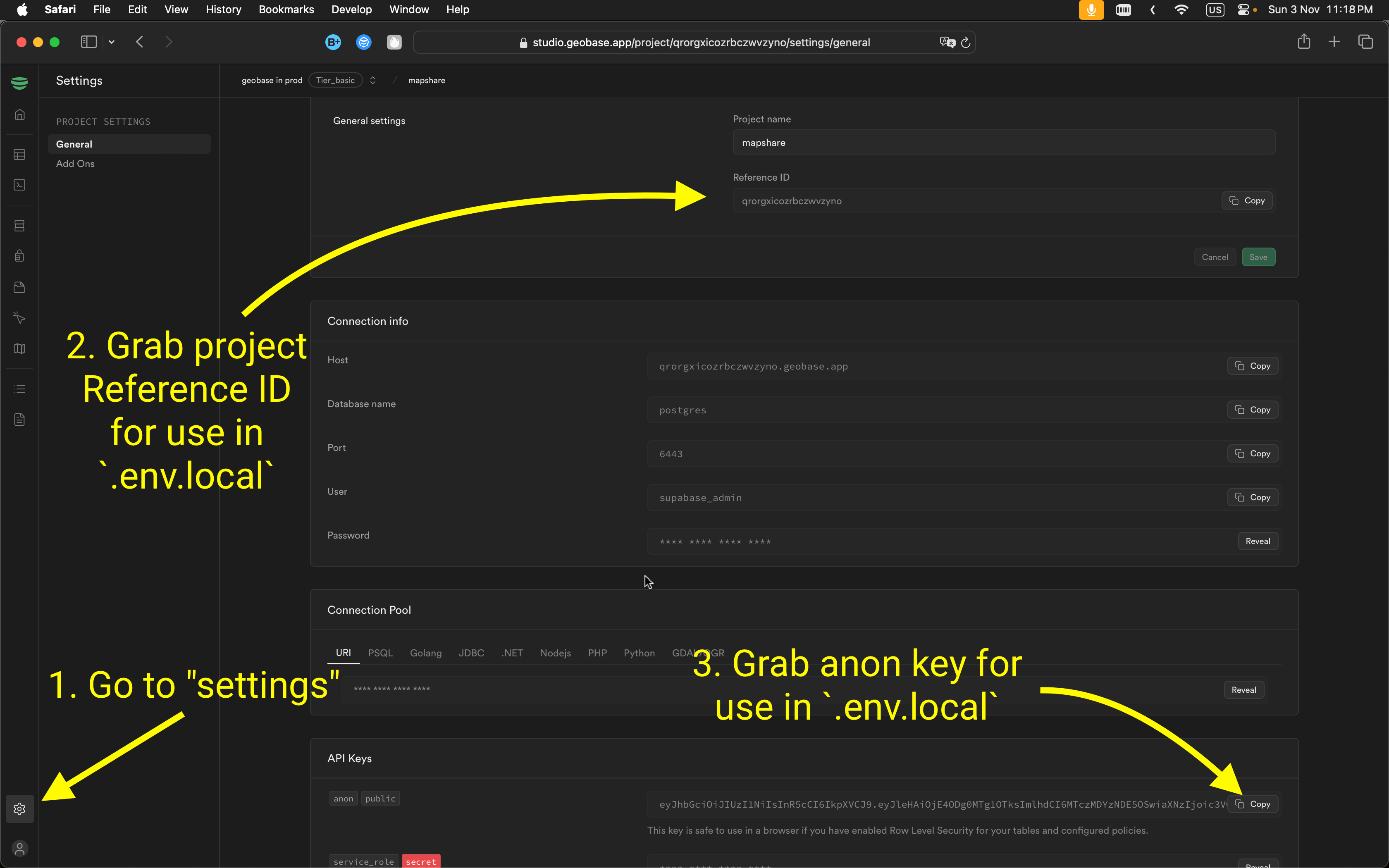
To connect your app to Geobase, configure these environment variables. Include them in a .env.local file for local development.
VITE_GEOBASE_URL=<Your Geobase URL>
VITE_GEOBASE_ANON_KEY=<Your Geobase Anon Key>
You can locate the project reference and anon key in your Geobase project settings.
Local Development
- Set Node.js version: Use Node version 21:
nvm use 21 - Install dependencies: Use your preferred package manager:
npm install # or yarn # or pnpm install - Start the development server with HTTPS enabled:
npm run dev --experimental-https
# or
yarn dev --experimental-https
# or
pnpm dev --experimental-https
Note: Without --experimental-https, the email verification links might redirect to https://localhost:5173/..., causing errors. You can navigate manually by removing https from the URL if needed.
Access the project at http://localhost:5173.
Database Overview
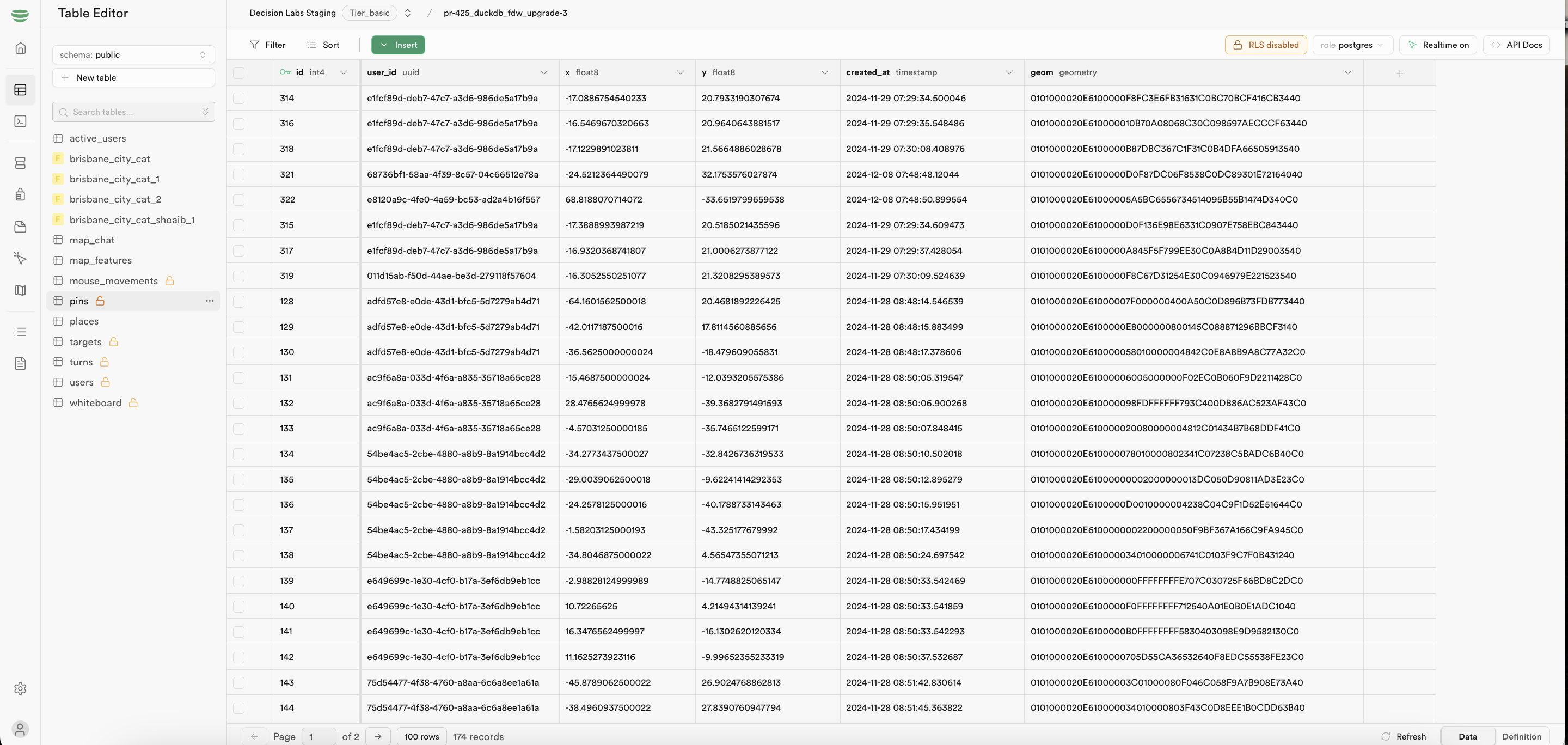
The database structure supports real-time collaboration with these key tables:
public.pins: Stores map pin locations
Learn More
For additional information, refer to:
For support, join our Discord community .